Lab 3 · Drive in Isaac Sim
What you do in this lab
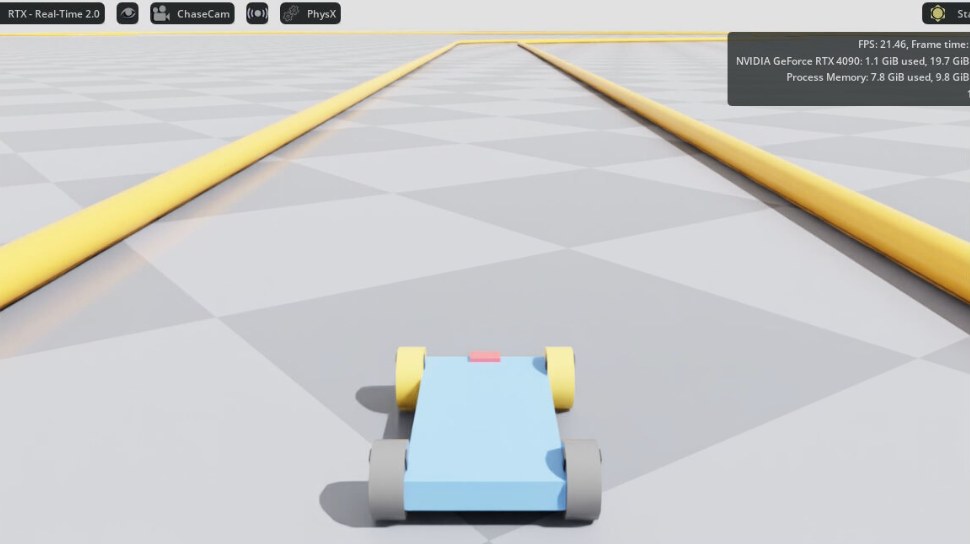
You drive the car that the training uses, in the simulator that the training uses, with your keyboard. No policy (the network that drives) yet: you are the driver. Then you open the program that turns your keys into wheel commands, and you change it.
Do this: read the cards. Then start a desktop, run one command, and drive one lap without a wall touch.
The cloud desktop
Isaac Sim needs a strong GPU. The Desktop page rents one and shows its screen in your browser: a full Linux desktop with a terminal and Isaac Sim 6.2.
| start | about 5 to 15 minutes |
| one session | 75 minutes; Extend adds 30, up to 180 |
| cost | your GPU minutes, from the start to Stop |
| files | nothing is kept after Stop |
The package on the desktop is GoatRacerLite: a small, open version of the training code, with a box car in place of the full twin. Same wheelbase (0.32 m), same track width (0.24 m), same motors.
The graph
Isaac Sim has a visual language, OmniGraph: boxes (nodes) with wires between them, run once per frame. Our graph reads four keys, makes a speed and a steering angle, and gives them to the Ackermann controller.
That node does the geometry of a car. In a turn the inner front wheel is on a smaller circle, so it must turn more. Ask for 0.30 rad and the node sends 0.337 rad to the left wheel and 0.270 rad to the right. The car then turns on a 1.05 m circle; the geometry says 1.03 m.
The knobs, and how they break
Each constant in the graph is a knob. Select the node, and change its value in the Property panel while the car drives.
MaxSpeed | 3 m/s at full throttle. Too high: you meet the wall before you can turn. |
MaxSteer | 0.5 rad, the full lock of the car. Lower: the car cannot make a hairpin. |
TurnGrip | The steering limit at speed: wheelbase x 4 m/s^2. Higher: the car slides. |
The limit is there because of a real fault. The first version sent full lock at any speed. At 3 m/s that asks the tires for 15 m/s^2 sideways, and they hold about 8. The car slid on a 1.06 m circle when the wheels pointed at a 0.59 m one. Now the graph reads the speed of the car and cuts the angle: 0.5 rad when slow, 0.14 rad at 3 m/s.
A second real fault: the car first drove at less than half speed. The stream drew 27 frames per second, and Isaac Sim moved the physics 1/60 s per frame. The scene now measures the true time and runs the steps that are missing.
Why you drive before you train
A policy gets the same car, the same motors and the same walls. What is hard for you is hard for it: the speed you can hold into a corner, the late turn that ends in the wall. The training does not remove that. It finds, over many thousand tries, what you find in a few laps.
Do this: drive one lap of Silverstone with no wall touch. Then set
MaxSpeed to 5 and try again. Then set TurnGrip to 4 and take a
corner at speed.
Follow the White Rabbit
The whole scene is one Python file, goatracer_lite/drive.py, in the desktop.
It makes the floor, the walls, the car, the camera and the graph. Read it there:
less goatracer_lite/drive.py.
- Ackermann steering geometry - why the two front wheels turn by different angles.
- OmniGraph - the node language of Isaac Sim.
Play
- Open the Desktop Press Start a desktop and wait for the screen. It opens in a new tab; keep this one for the steps.
- A terminal named GoatRacerLite is open. Type:
./lite.sh drive
The car shows at the start of Silverstone, about 15 seconds later. - Click one time in the picture of the car. Then drive:
W forward S reverse A left D right
- Show the graph:
./lite.sh drive --graph
It opens below the picture. SelectMaxSpeedand change its value in the Property panel, on the right. - Another track:
./lite.sh drive --track Oval. A test of the graph with no keys:./lite.sh drive --check. - Press Stop on the Desktop page when you are done. The minutes stop there.
// No keys? Click in the picture again: the keys go to the window that has the focus.
Code
// The wires of the graph, from goatracer_lite/drive.py. Each line is one
wire: an output of one node to an input of the next. Edit the file on the desktop, then run
./lite.sh drive again.
("KeyForward.outputs:isPressed", "Forward.inputs:value"),
("KeyReverse.outputs:isPressed", "Reverse.inputs:value"),
("Forward.outputs:converted", "Throttle.inputs:a"), ("Reverse.outputs:converted", "Throttle.inputs:b"),
("Throttle.outputs:difference", "Speed.inputs:a"), ("MaxSpeed.inputs:value", "Speed.inputs:b"),

("Odometry.outputs:linearVelocity", "CarSpeed.inputs:input"),
("CarSpeed.outputs:magnitude", "SpeedSquared.inputs:a"), ("CarSpeed.outputs:magnitude", "SpeedSquared.inputs:b"),
("TurnGrip.inputs:value", "GripAngle.inputs:a"), ("Floor.outputs:sum", "GripAngle.inputs:b"),
("GripAngle.outputs:result", "SteerLimit.inputs:input"),
("Zero.inputs:value", "SteerLimit.inputs:lower"), ("MaxSteer.inputs:value", "SteerLimit.inputs:upper"),
("Turn.outputs:difference", "SteeringAngle.inputs:a"), ("SteerLimit.outputs:result", "SteeringAngle.inputs:b"),

("Speed.outputs:product", "Ackermann.inputs:speed"),
("SteeringAngle.outputs:product", "Ackermann.inputs:steeringAngle"),
("Ackermann.outputs:wheelAngles", "SteerJoints.inputs:positionCommand"),
("Ackermann.outputs:wheelRotationVelocity", "WheelJoints.inputs:velocityCommand"),
Do this: find the line that gives MaxSteer to the limit. That is why
the car has its full lock when it is slow.
Check yourself
Only a check: nothing depends on it. Take it any time.
- The cloud desktop is a rented GPU with Isaac Sim. It costs GPU minutes until Stop, and keeps nothing.
- An OmniGraph is nodes and wires, run each frame. Ours goes from keys to the Ackermann controller to the joints.
- The Ackermann controller turns the inner wheel more: 0.337 and 0.270 rad for a 0.30 rad turn.
- Full lock at speed slides the car. The graph cuts the angle with speed: 0.5 rad slow, 0.14 rad at 3 m/s.
- RoboRacer course: Lecture 6 - Vehicle States and Vehicle Dynamics - the bicycle model: what the simulator's plant is built on
- RoboRacer course: Lecture 4 - Laplace Domain Dynamics and PID - the control loop behind the motor and the steering servo
// roboracer.ai (formerly F1TENTH), not goatracer.ai. Each link opens in a new tab.