Lab 8 · Make a Track
What you do in this lab
Every track the car has trained on came out of one program, the track generator. In this lab you run it yourself: you write a track as a list of segments, the generator builds the walls and checks the loop, and when the loop is good you drive it in the simulator.
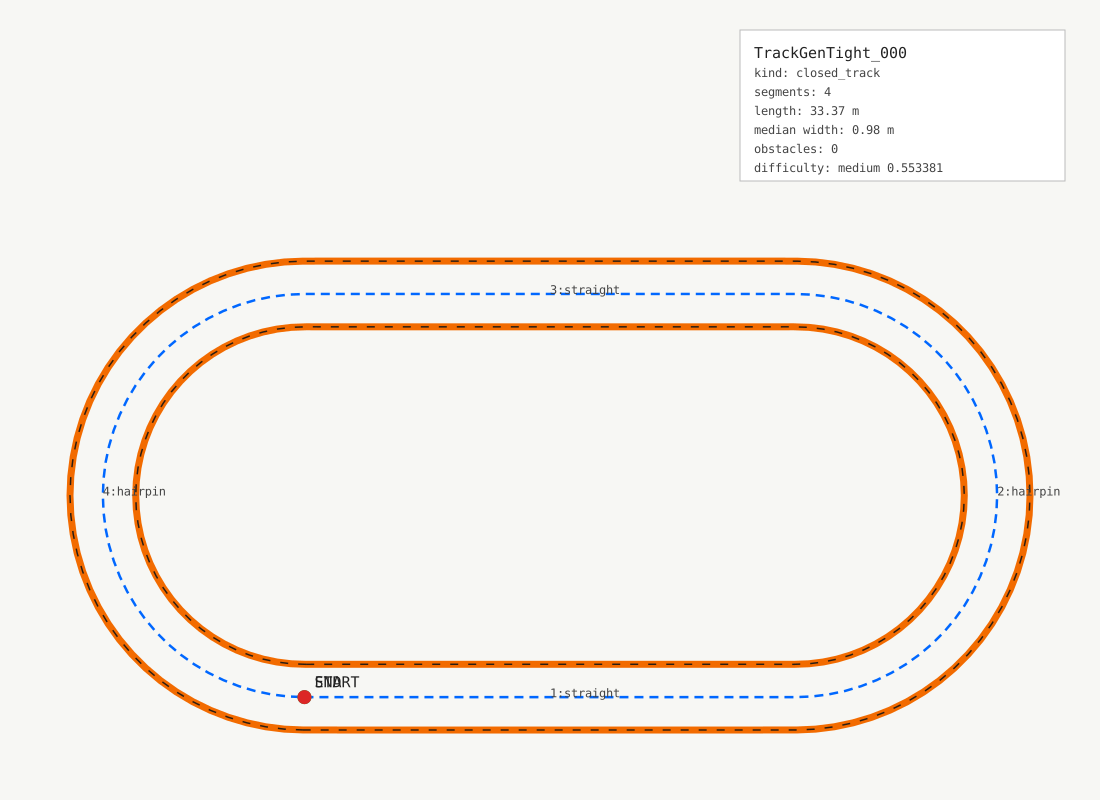
Do this: read the four cards below. Then in the Code card run the script as it is. It makes an oval. Change it until you have a track of your own, and drive one lap on it. That lap finishes the lab.
What a track is to the sim
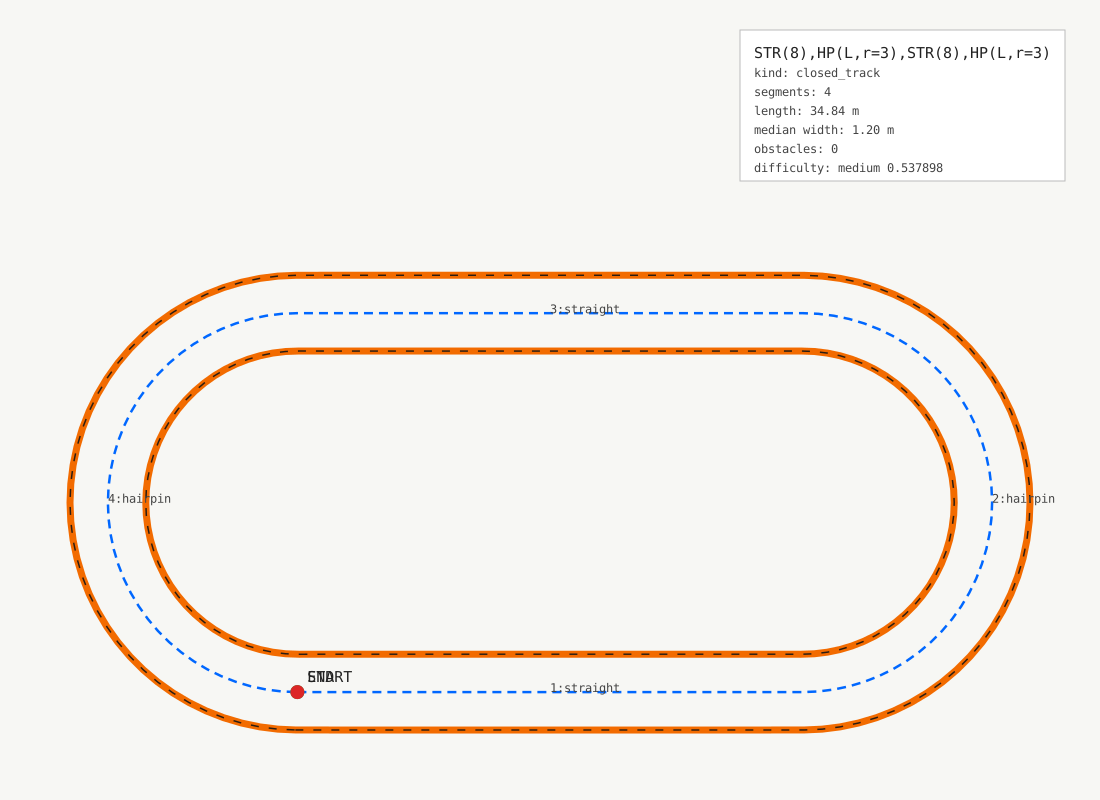
STR(8),HP(L,r=3),STR(8),HP(L,r=3).
Orange is the wall, the blue dashes are the centerline, the marker is the start.A track is three lines on the floor: the centerline, and a wall on each side of it. The walls are the orange flex duct you saw in every camera frame, 10 inches across. Plus a list of waypoints along the centerline, where a lap starts and where the car counts progress.
That is all the sim gets: four files of x, y pairs in meters. From them it builds the 3D scene, one cylinder of duct per wall segment, and the lidar the policy sees is a ray cast against those cylinders. The simulator on this page builds the same scene from the same files, in your browser.
Segments
You do not draw the lines. You list segments, in driving order, and the generator chains them: each one starts where the last one ended, pointing the same way. A straight, a turn of one radius, a hairpin, a chicane, esses, a kink. The generator samples the centerline every 0.25 m and offsets a wall half a width to each side.
STR(8) | a straight, 8 m |
ARC(L,r=3,angle=90) | a turn: left, radius 3 m, 90 degrees |
HP(L,r=3) | a hairpin: left, radius 3 m, 180 degrees |
CHI(LR,r=2) | a chicane: a left then a right |
ESS(L,count=4,r=2) | esses: four bends, the first one left |
KINK(R,r=6,angle=20) | a kink: a slight right |
Do this: in the Code card, change the first straight to STR(12) and
run. The oval is longer. Then change WIDTH to 2.0 and run again: the walls
move apart, and the hairpins get an inner wall with a tighter bend than the outer
one.
Closing the loop
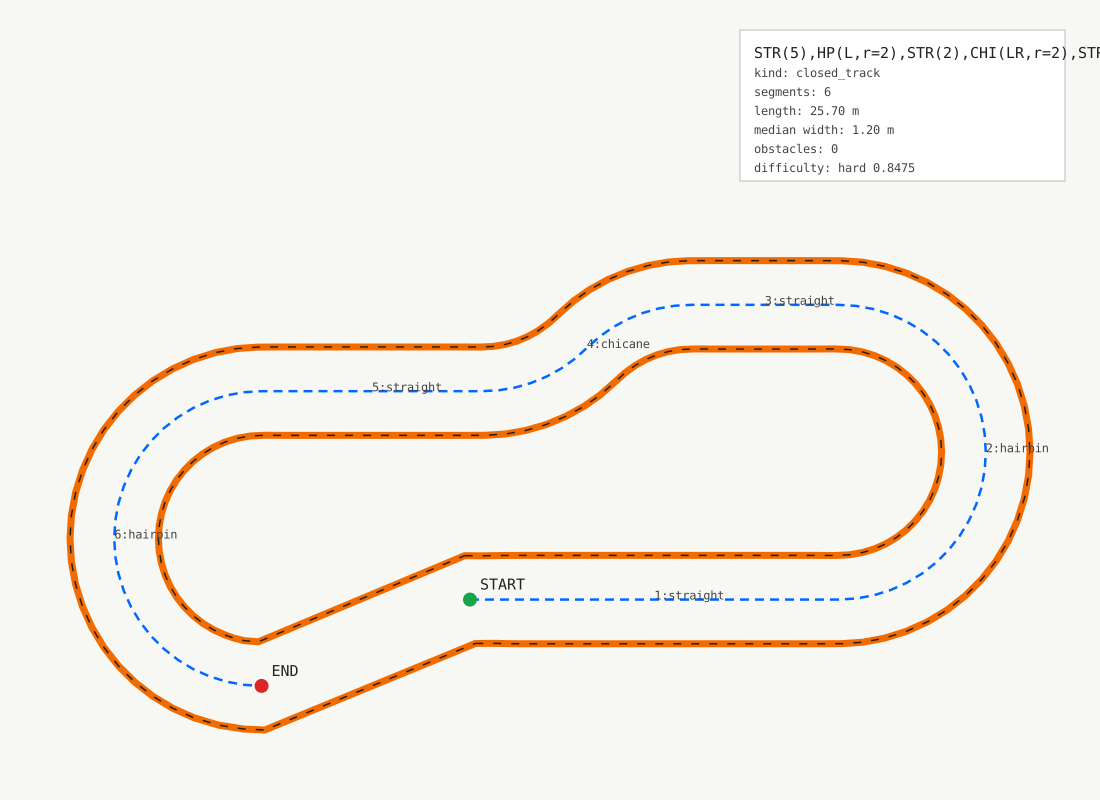
A lap needs a loop: the last segment must end where the first began, pointing the same way. The generator does not close it for you. It checks, and tells you what is wrong: the seam gap and the seam angle at the join, the centerline or a wall crossing itself, the two walls crossing each other, and two parts of the track coming closer than one width. A sharp inner corner makes the wall fold over itself. The generator repairs that one, and says so.
Do this: put CHI(LR,r=2) in the middle of the first straight and
run. Read the verdicts in Play. Then put the same chicane in the second straight, and
the loop closes again. Every segment you add on one side needs its answer on the
other.
Families
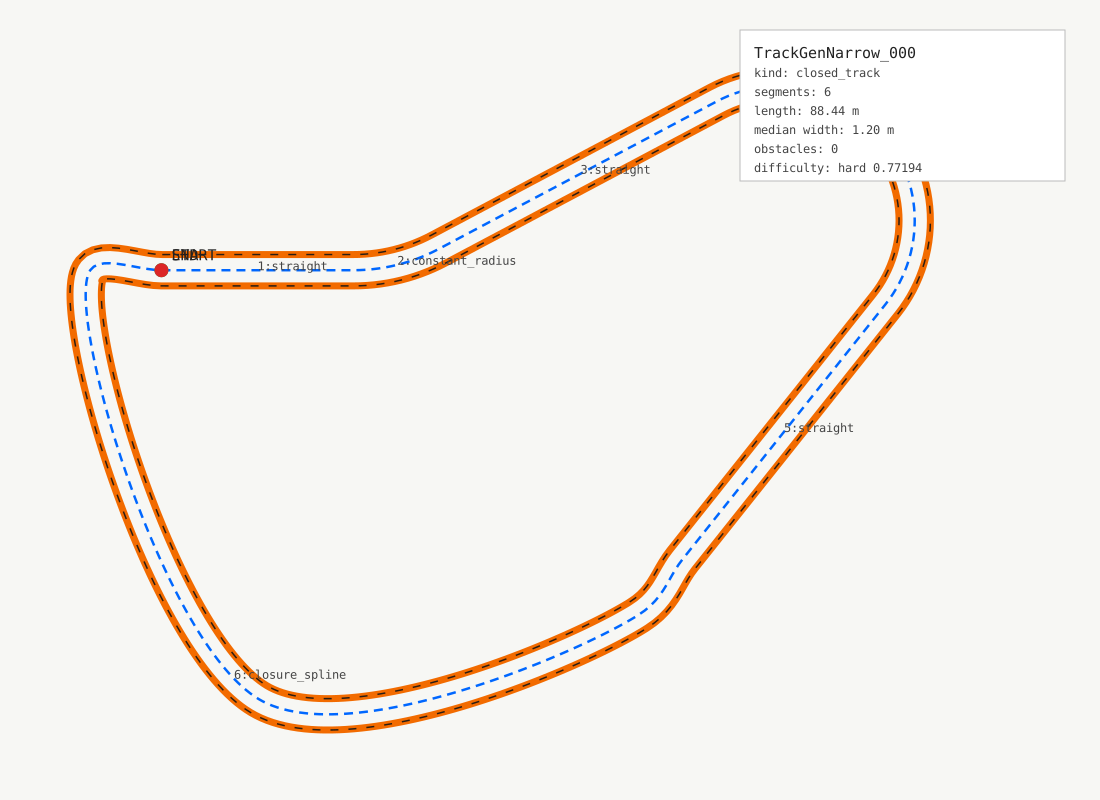
Nobody writes the training tracks by hand. The generator's batch mode draws segments at random from a profile (which features, what radii, what widths) with a seed per track, keeps the loops that pass every check, and writes a family: eight tracks to train on and two holdout tracks the policy never sees.
That is why the programs in Train for the Real Car are named by their track family. Wide Clearance trained on the narrow set plus the Oval, Sprint and Laguna Seca. Tight Progress trained on the tight 1 m family. A policy is judged on the holdout, because a track it trained on proves nothing.
Your own track in the sim
The track you drive on this page is a browser scene. To train a policy on it, the same
generator writes the four files to disk, the sim builds track.usd from them,
and the track joins a task's list. Every track of a task lives in one shared scene at its
own offset, so a new family gets a row of offsets before its first run. That recipe is
the rabbit hole.
Do this: make a track with at least five segments that passes every check, and drive a lap on it. Then try to break it: a hairpin of radius 1 at width 2, and read which check fails.
Follow the White Rabbit
The sim path, in five lines. Generate on the host: goat-trackgen create --dsl
"STR(8),HP(L,r=3),STR(8),HP(L,r=3)" --track-id Mine --closed --out tracks/data/Mine.
Build the USD inside the sim container: goat-trackgen usd --dataset
tracks/data/Mine. Give the track an entry in the world offsets table. Register a
new task version whose track list names it. Probe at full scale for NaN, then train.
- TrackGen on the sim wiki - the generator's workflow guide: profiles, batches, datasets.
- f1tenth_racetracks - where Austin, Monza, Silverstone, Spa and Spielberg in the sim's track list come from: real circuits, scaled to 1/10.
- Catmull-Rom spline - how the generator closes a random loop and draws a hand-traced hairpin.
Play
// Run the script in the Code card below. The track draws here.
// Arrow keys or W A S D. The green rays are the lidar, the same fan the car's policy sees. One lap on your own track finishes the lab.
Code
// Real Python, run in your browser on the same generator the sim's tracks come from. make(...) compiles the segments and checks the loop, show(...) draws it in the Play card. Edit TRACK, hit Run.
// the rest of the lab, file by file. Your file is the editor above; these are the exact files that run it. Enough to reproduce the lab outside this page.
car/robot/vision/labs/runners/make_a_track_web.py
"""The `trackgen` module of Make a Track (#567): the student's script calls
make() and show(). Runs in the browser (Pyodide) on top of the real
goat_trackgen package, served file by file from the sim tree; the page
(static/js/trackgen.js) registers `goat_track` and draws what show() sends.
No file on the car or in the sim imports this."""

import json
import os
from pathlib import Path

import make_a_track_shims  # noqa: F401  yaml and cKDTree stand-ins, before goat_trackgen
import goat_track  # the page: show(payload)
import goat_track_model as tm  # app/race/track.py: the sim's resampled track model
from goat_trackgen.draw import draw_track_svg
from goat_trackgen.dsl import compile_dsl
from goat_trackgen.geometry_validation import track_geometry_report
from goat_trackgen.wall_repair import build_repaired_track_walls

# what each check means, in the words of the read
ISSUES = {
    "centerline_seam_gap": "the loop does not close: the last segment ends away from the start",
    "seam_tangent_discontinuity": "the loop closes at an angle: the end does not point the way the start does",
    "centerline_self_intersection": "the centerline crosses itself",
    "left_wall_self_intersection": "the outer wall crosses itself",
    "right_wall_self_intersection": "the inner wall crosses itself",
    "wall_cross_intersection": "the two walls cross each other",
    "insufficient_centerline_clearance": "two parts of the track come closer than one width",
    "wall_midpoint_drift": "the walls drift away from the centerline",
    "wall_span_error": "the walls are not one width apart",
    "wall_sample_count_mismatch": "the walls and the centerline have different sample counts",
    "repaired_corridor_invalid": "the walls could not be repaired into a corridor",
}
TRACKS = Path("tracks")
NAME = "Mine"


def make(dsl: str, width: float = 1.2) -> dict:
    """Compile the segments, build the walls, run the geometry checks."""
    track = compile_dsl(
        str(dsl), track_id=NAME, closed=True, width_left_m=width / 2, width_right_m=width / 2
    )
    report = track_geometry_report(track)
    left, right, _ = build_repaired_track_walls(track)
    return {
        "track": track,
        "dsl": str(dsl),
        "width": float(width),
        "report": report,
        "left": left,
        "right": right,
    }


def _csv(path: Path, pts) -> None:
    path.write_text("x_m,y_m\n" + "".join(f"{x:.6f},{y:.6f}\n" for x, y in pts))


def _sim_view(t: dict) -> tuple[dict, dict]:
    """The two JSONs the browser stage takes for a sim track: the polylines
    it draws and the env's resampled model it drives against. The same
    code path as /tracks/<name>/geometry.json and model.json."""
    d = TRACKS / NAME
    d.mkdir(parents=True, exist_ok=True)
    c = t["track"].centerline
    _csv(d / "centerline.csv", c)
    _csv(d / "wall_outer.csv", t["left"])  # the export's convention: CCW left is outer
    _csv(d / "wall_inner.csv", t["right"])
    step = max(1, len(c) // 64)
    _csv(d / "raceline_waypoints.csv", c[::step])
    os.environ["GOATRACER_TRACKS_DIR"] = str(TRACKS)
    tm.geometry.cache_clear()  # both read the files once per name: the name is always Mine
    tm.model.cache_clear()
    return tm.geometry(NAME), tm.model(NAME).to_dict()


def show(t: dict) -> None:
    """Draw the track in the Play card: the generator's own preview, the
    verdict of every check, and, when the loop is valid, the stage."""
    track, report = t["track"], t["report"]
    issues = [str(i) for i in report.get("issues", [])]
    svg = draw_track_svg(track, Path("/tmp/preview.svg"), title=t["dsl"]).read_text()
    c = track.centerline
    length = float(sum(((c[i + 1] - c[i]) ** 2).sum() ** 0.5 for i in range(len(c) - 1)))
    payload = {
        "dsl": t["dsl"],
        "width": t["width"],
        "valid": not issues,
        "issues": [{"key": k, "text": ISSUES.get(k, k)} for k in issues],
        "seam_gap_m": report.get("centerline_seam_gap_m"),
        "length_m": length,
        "segments": [s.segment_class for s in track.segments],
        "svg": svg,
    }
    print(f"{len(track.segments)} segments, {length:.1f} m, {t['width']:.2f} m wide")
    if issues:
        for i in payload["issues"]:
            print(f"  x {i['text']}")
        print("fix the loop, then run again")
    else:
        print("  every check passed: drive it in the Play card")
        payload["geometry"], payload["model"] = _sim_view(t)
    goat_track.show(json.dumps(payload))
Check yourself
Only a check: nothing depends on it. Take it any time.
- A track is three polylines and a list of waypoints: the centerline and two walls of orange duct. The sim builds the 3D scene from those files.
- A track is a list of segments in driving order. The generator chains them, offsets the walls one width apart, and samples every 0.25 m.
- The loop must close, and it must not touch itself. The geometry checks say which rule a track breaks before the sim ever sees it.
- The car's programs are named by their track family. A family is a seeded batch from one profile, split into train and holdout.
// what you should be able to do now. Each one traces to a line in the script or a verdict in Play.
- Write an oval as four segments and say why the two hairpins must turn the same way.
- Add a chicane to a straight and say what the seam gap verdict means when the loop no longer closes.
- Halve the width and say which check fails first on a tight hairpin, and why.
- Say what a holdout track is for, and why a policy is judged on it and not on a train track.
- RoboRacer course: Lecture 20 - Raceline Optimization - the fastest line around a track, by optimization instead of learning
- RoboRacer course: Module G - The RoboRacer Grand Prix - how a real race weekend runs
// roboracer.ai (formerly F1TENTH), not goatracer.ai. Each link opens in a new tab.